

ANALYZE
Make decisions with data‑driven audience analytics
Measure who notices your digital screens, checkout displays and promotional stands. Compare audience engagement, content and placements to make better marketing decisions.

EU AI ACT
COMPLIANT
COMPLIANT

GDPR
COMPLIANT
COMPLIANT

LGPD
COMPLIANT
COMPLIANT

CCPA
COMPLIANT
COMPLIANT
Audience Analytics for Digital Signage & Retail Media

Advanced data analytics
TRUSTED BY COMPANIES OF ALL SIZES


Understand the audience at your marketing displays

Get audience data in real time
It allows to showcase your latest products, services, and promotions in real time.

Stay current. Save time and resources.
Lets your business quickly adapt to new market trends and customer preferences.

Manage thousands of screens with one person
Digital Signage provides centralized control over multimedia content across big screen networks
Audience Analytics
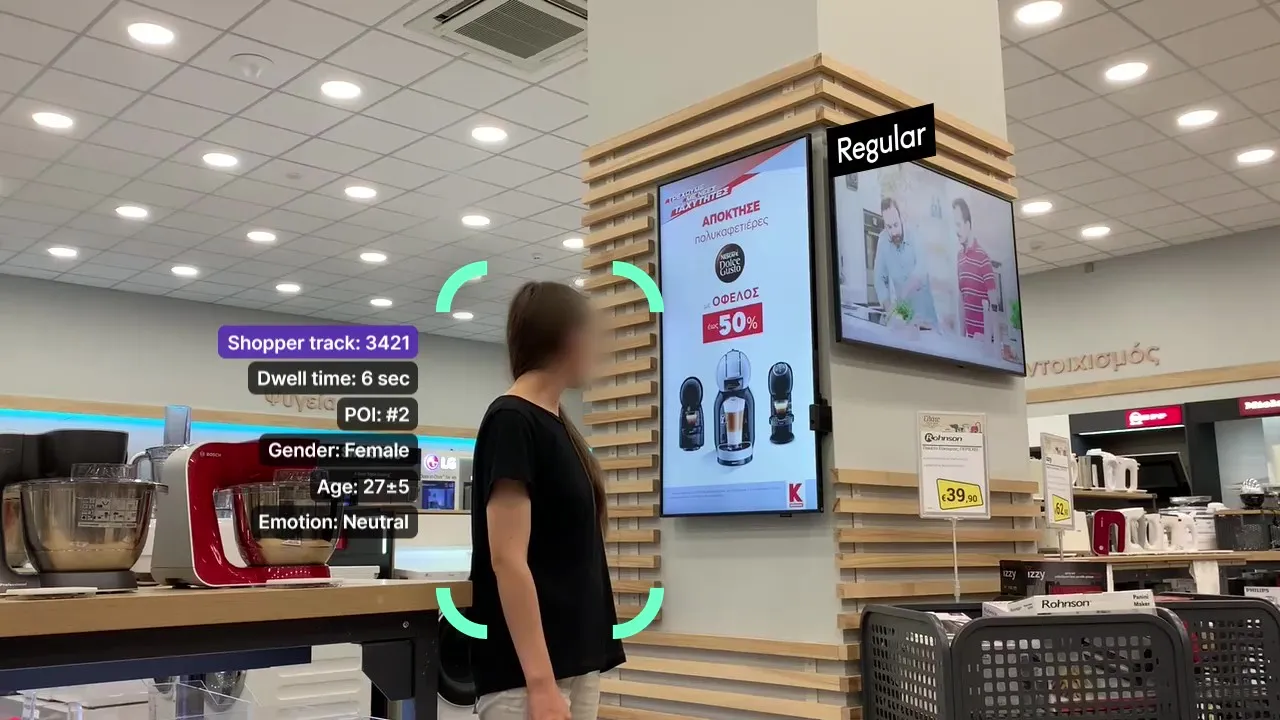
DISPL measures audience contacts, estimated demographics and attention at a defined screen or promotional display. Mount a camera on or beside the display, facing its audience, and use the reports to compare content and placements.
Make decisions based on data
- Audience contacts, estimated views, viewing time and demographic trends at each display.
- Compare campaigns and creative variants.
- Compare screens and promotional displays.
Learn more

Privacy
Review aggregated audience and engagement reports for each marketing display. Confirm the processing, retention and privacy settings for your deployment.


Local AI with edge computing
On-device analytics supports timely measurement at the marketing display.


Deployment & Data Protection
Define the viewing area, camera placement and reporting needs before rollout. Validate the setup in your actual lighting and operating conditions.


Define the audience area
Choose one marketing surface and the area where people can see it. Keep the measurement tied to that screen or display.

Position the camera at the display
Mount the camera on or beside the marketing surface, facing its audience. Check camera height, angle, distance, lighting and obstructions during a pilot.

Compare marketing performance
Compare audience engagement across creative variants, time periods and display locations. Add playback or aggregated sales data through the relevant integrations.
Choose your measurement: Audience Analytics for displays and campaigns
Audience Analytics describes engagement at a defined marketing display. Campaign reporting adds content playback data to compare creative performance. Choose the combination that answers your marketing question.

DISPLAY AUDIENCE

PURPOSE

Measure attention at a screen or promotional display

Connect audience engagement with the content shown
REPORTING BASIS
Contacts and estimated views at the defined display
Audience measurements paired with content playback logs
DEPTH OF ANALYSIS
Audience composition, engagement and viewing time
Estimated views and engagement by content or campaign
MEASUREMENT AREAS
Screens, checkout displays and promotional stands
Digital screens with connected playback data
BUSINESS IMPACT
Compare the effectiveness of display placements
Compare creative variants and campaign performance
COMBINED USE
Understand who notices the marketing display
Identify which content earns attention at that display
Screen & Campaign Analytics
This solution is designed to analyze the effectiveness of in-store marketing. It collects data on the number of impressions, views, dwell‑time, and demographics of the viewers.

Know the force of content on your screens
Use audience measurement with content playback records to compare campaign delivery and engagement. Share aggregated performance reports with brands and advertisers.
 Estimated views
 Engagement
 A/B tests
 Viewing time
Learn more
Detailed reports
Compare estimated views with audience contacts in the configured viewing area. Keep the denominator and view criteria consistent.


Clearly defined view metrics
A view is estimated from presence, face orientation and viewing duration at the screen. Apply consistent criteria when comparing campaigns.


Validate each placement
Check the camera angle, lighting and viewing area before comparing results across screens.


Integrate analytics with POS systems or enrich your BI system with API

Checkout Audience Analytics
Audience Analytics for Checkout Displays


API add-ons for your BI system
Integrate DISPL’s analytics data into the existing BI system
Get an expert consultation



Advanced Data Analytics
DISPL Dashboard suits all your needs
Compare audience engagement across screens, campaigns and time periods. Connect aggregated sales data to explore relationships with marketing activity through the relevant integrations.
Make data-driven decisions
 Audience demographics and attention
 Engagement at each marketing surface
 Marketing performance
 Placement performance
 Reports by day, week, month and year

Sell more with engaging and targeted content
 Control promotional content remotely
 Target different groups with special content
 Attract attention of shoppers
 Analyze content efficiency
 Relocate budgets on best-performing activities

Measure attention and engagement
 Compare screens and marketing touchpoints
 Compare screens, displays and promotional stands
 Find the placements that earn attention
 Compare creative performance at each touchpoint
 Compare campaigns across your display network

Find the best times for your campaigns
 See when your target audience engages with displays
 Schedule content around audience engagement
 Measure attention to promotional messages
 Compare audience profiles across touchpoints
 Show relevant offers at the point of interest

Manage all your hardware in one platform
 Real-time monitoring
 Configure switching and recovery rules
- Make planning according to criteria / tags, locations, screen formats, interests

Key features

Sales and audience data
Compare display audience metrics with aggregated POS sales by time period or location. This integration helps reveal relationships between marketing exposure and sales; it does not identify an individual's purchases or prove causation.

Optimize your sales forecast
Bring display audience metrics, campaign history, aggregated sales and weather into your BI workflow. Use the relevant integrations to test which factors are associated with changes in performance.

Use Audience Analytics
Businesses with CMS can integrate audience analytics data into their platforms. This capability ensures that even non-DISPL CMS users can enrich their systems with regular audience insights for improved content planning and higher customer engagement.

Compare marketing placements
Bring audience and attention reports from each display into your BI tools. Compare equivalent placements, campaigns and time periods using consistent measurement definitions.

Better customer segmentation
Use aggregated demographic and engagement trends to plan content for the audience at each screen. Test creative variants and evaluate how attention changes.

Universal data analysis platform
API users gain the flexibility to employ a single, universal application for analyzing data across different platforms. This unified approach simplifies data analysis, reduces the need for multiple tools, and enhances the efficiency of insights generation.
Compatible with all operating systems


Features & Architecture
PRESENTATION
Download a presentation with architecture and features of our platform
Download PDF


Frequently asked questions
Got questions? Book a 30-minute call to learn how to analyze, engage, and monetize your offline audience to boost sales.
How many visitors come to my store and who are they?
DISPL will show you the number of visitors by day/week/month and their socio-demographic portrait.
How many visitors convert into customers?
See the conversion to customers and match checks with socio-demographic portraits using API.
How can I measure effectiveness of my printed ad or my Digital Signage content?
Number of contacts, engagement time and other metrics will tell you how effective your content is.
Does my POSm content convert into sales?
With DISPL, you can measure conversion into visitor engagement and further into sales.
How can I check marketing efficiency?
You can understand marketing efficiency by checking the amount of visitors with maximum engagement.
Any chance to see the best-performing brand zone?
Yes, the data will show you which brand zones perform better so you can adjust your offline strategy.
How do I understand which marketing content is more effective?
With DISPL's Engagement Data you can understand with marketing campaign is better.
Who is my ideal customer?
Age and gender data helps you get a realistic portrait of your audience and adjust your campaign message accordingly.
Can I customize a campaign for better targeting?
Target campaigns by age, gender, emotions or additional properties like hat or glasses to increase the effectiveness of your marketing campaigns.
Can I adjust my trade marketing budgets according to this data?
Use the collected data to enrich your online targets and understand how effective your online campaigns were.
Do you have an API to match your data with my purchases and stocks?
Yes, we can match our data with yours.
Can I provide brands with reports that they can use to improve sales?
Yes, you can provide brands with access to actionable reports.
Can I use this data to optimise sales assistants' schedule?
Yes, you can see when your employees bring more conversions and optimize their schedule according to this data.

Learn how to analyze, act and monetize in offline to increase sales
Oops! Something went wrong while submitting the form.